Welcome to another beginner SEO lesson. In my last post, I showed you how to choose a primary keyword for whatever web page you're working on. It's a really common question I get, and a point of confusion for beginners. This is the exact follow-up: once you've chosen your primary keyword, what are you supposed to do with it?
We're using the same example business from last time, Helen's Kitchen Cooking School, and the primary keyword we landed on was "cooking classes in Natick, Massachusetts." I took inspiration from that website and built a couple of mockups of the top of the homepage so we can talk through what to do with the keyword. The primary keyword is the most important one, so it gets prime real estate, which centers around the top of the page.
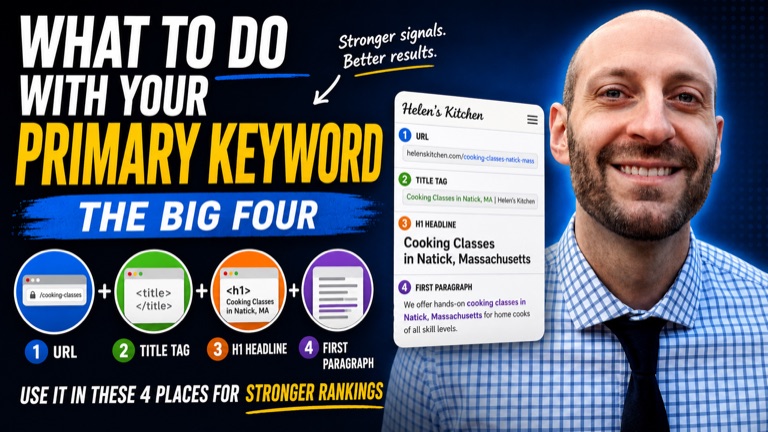
The Big Four
Here's what you do with your primary keyword for SEO. You do what I call the big four. You put it in the URL, the title tag, the H1 headline, and the first paragraph. When you use it in these four areas, they combine to send a really strong ranking signal. If someone searches for "cooking classes in Natick, MA" and you've used that keyword in all four places, it makes it really easy for Google to match your page with that search.
You won't always land all four, and that's fine. Google will get the point if you use the primary keyword in at least two of these four areas. Let's walk through each one.
1. The URL
The URL is basically the address of the web page, the part you see at the top of Chrome. (Worth mentioning in case you're a beginner.)
Helen doesn't use the keyword in her URL, and in my mockup I don't either. Without introducing an exception too early: you have to use your discretion in every SEO situation. This is a homepage, and her business is called Helen's Kitchen, so the homepage URL is going to be the brand. We can't really sneak a keyword in there, and I wouldn't try. I'd let the homepage URL be the brand.
If it were a deeper page, though, it would work really well. For any page other than the homepage, you can usually work the keyword in, like helenskitchen.com/cooking-classes-natick-mass. So the URL is the first area to consider, but if you're in a scenario where it doesn't fit, don't force it.
2. The Title Tag
The title tag lives in the code of a web page, so you can't see it just by opening the page in Chrome. I want to keep this simple and skip the code, so here's an easy way to see it: in any browser, hover over the tab and wait, and the title tag pops up. For the real site it reads "Helen's Kitchen Cooking School," with no keyword.
In my mockup, I'd make the title tag "Cooking Classes in Natick, MA | Helen's Kitchen" (that vertical bar is called a pipe). That gets our keyword into the first of the big four, and I recommend front-loading it so the primary keyword is the first part of the title tag. If you're not sure how to update it, you don't necessarily need to touch code, platforms like WordPress let you edit it in the back end. (I'll cover that in another video.)
One more thing about title tags: when you search Google, the title tag is exactly what shows up as that clickable blue headline. So if someone searches "cooking classes Natick, MA" and sees those words right there in your title, they think, "perfect match." It's not all about Google, we want people to see that match too. That's why the title tag is such an important place for your primary keyword, and such a loud ranking signal.
3. The H1 Headline
The H1 is your primary heading on the page. Helen's current heading has no keyword in it. In version one of my mockup, I set the primary keyword as the H1, which sends a really powerful signal.
Here's where discretion comes in again. Maybe the client doesn't love that, her current H1 is something like "Welcome to Helen's Kitchen," and she may really want to welcome people warmly. So we might compromise. In a second mockup, I put the primary keyword in an eyebrow (the small line above the H1) and then use warmer, friendlier copywriting as the actual H1. That's good technique: you get the keyword signal in, while working with the client to accommodate what they want.
So go for the keyword in the H1 if you can, but if it reads unnaturally, the eyebrow-plus-H1 setup is a great option.
4. The First Paragraph
The fourth area is the first real paragraph of the page. You might ask, "isn't that the text right under the H1?" Arguably, yes. But I want to teach you to build pages tastefully. The goal is to use the primary keyword, true, but we don't want the page to turn spammy or sound unnatural. We're not stuffing keywords everywhere and ruining the experience.
So rather than force it into the very first line, I'd often place it a little lower in the opening content, where it fits naturally. The keyword still lands in the first paragraph of real copy, it just reads like something a human would actually write.
Be Flexible
That's the big four, and that's how you use a primary keyword for SEO:
- URL - use it if you can, which mostly applies to deeper pages; on a homepage the URL often just has to be the brand, and that's okay.
- Title tag - definitely try to get it in, and front-load it.
- H1 - try for it, or use the eyebrow-plus-H1 compromise if it reads unnaturally.
- First paragraph - work it in tastefully.
If you can get all four, it's extremely powerful. If you have to compromise on one or partially compromise on another, that can be okay too. It's fine to be flexible, Google will get the point if you use the primary keyword in at least two of these four areas.
What's Next
So now we know how to choose a primary keyword and how to use it. In the next video, we'll talk about secondary keywords: how to choose them and how to use them. If you have any questions, or you're in a scenario where you're not sure how to get the primary keyword into one or more of the big four, leave me a comment and we'll figure it out together.