Today I want to talk about a skill I built with Claude Code called the Master Prospector. Originally this was called the Master Link Prospector. If you've done SEO for any length of time, link prospecting is a pretty common activity. The reason I took the "link" part out of it is because this skill doesn't just look for link opportunities. We're good with mentions these days as well, since those can be impactful for AI search.
I'm not going to show you every nitty-gritty detail on how to build this. What I am going to do is show you what I built, and hopefully it gives you all the ideas you need to build your own. Mine has a lot of proprietary things built into it that wouldn't really apply to you, and when you build your own, you're going to have your own things you build in. That's why I think we should all build our own rather than use one that's pre-built for us.
The three problems it solves
Let's talk about what this thing does, because it is a beast. Prospecting is a grind, and it comes with three problems this skill is built to solve:
- It eats hours. It takes a lot of digging to find the right opportunities.
- It leaves blind spots. When someone's doing this exercise by hand, there can be a lot they miss.
- It's easy to duplicate effort. Once you've put together a list and done all your signing up and outreach, the next run needs really accurate record keeping so you don't repeat what you already did.
What the skill does is use four sub-skills, and it's just like having four specialists aimed at this task. They're all hunting in parallel, and then they report up to a master orchestrator skill that dedupes the information and puts everything together in a nice sequenced outreach program.
It takes about 10 minutes to run, and what you get out of it is incredible.
You could have months, or even more than a year, of outreach work to do just from that one 10-minute run.
Like I said, we're building citations here. Most of the opportunities are probably going to result in a link, which is great. Links still matter, and we still want them. But we'd be okay with some of them ending up as mentions.
What you get: an explainer doc and a workbook
The two things this master skill outputs are an explainer doc and a workbook.
The explainer doc. I love this one because Claude reports to me on what happened: here's what I did, here's what I found, these are the opportunities I chose to focus on and why. I like it to report to me just like a human direct report, and it tells me how much I need to look into the research exercise. Is there anything I need to go back and check? Did Claude go off the rails? That kind of thing.
The workbook. You get two tabs. Your working tab has all the opportunities and tons of columns that give you really relevant data on each one. The second tab is a "how to use this workbook" explanation: best practices, color coding, useful links, and an outreach template. It's got everything, and it's there to make the whole thing handoff ready.
Because that's really what we're doing: all the upfront research with AI, and then it's up to a human to vet each opportunity to make sure it makes sense for the client, and then perform the actual outreach, sign up for a profile, or whatever the opportunity requires.
The four sub-skills
Let's talk about the four skills that go into the master skill. These were things my team and I were doing anyway, and that's where I got the idea. I built the skill, tested it, and it's been working incredibly well.
1. The Sixth City Marketing Link Prospector. Internally, we have a spreadsheet with more than a decade's worth of learnings from link building. We've got the sites that have linked to us, the clients they've linked to, wins, playbooks, failures, and insights. It's essentially a diary of all the crazy efforts we've tried over the years. This is really the secret sauce of the skill. You might not have something like this, and I'll talk about how you can build one in a minute. After I give the master skill a client, it researches that client a little, then goes into this proprietary data and grabs the bits that are most relevant.
2. The Ahrefs Link Intersect. If you're not familiar with it, this gives you other websites that link to two or more competitors, but not your client. You get a lot of really good opportunities out of this. All you have to do is hook into the Ahrefs MCP. I do it with Claude Code, and it's super easy: I just ask Claude Code how to hook into it, and it gives me a step-by-step.
3. The SparkToro prospector. This uses the SparkToro MCP that was just newly released. With the information about your client, this skill develops an audience report within SparkToro, then looks at websites, podcasts, and even Reddit threads and plucks out the most relevant opportunities. This is from the audience perspective, so you can see why each of these four activities comes at prospecting from a slightly different angle. That's what makes the final report so incredible.
4. The Google SERP prospector. To round things out, this one does a bunch of site: searches and relevant searches trying to surface opportunities. If you're a local business, that might be chambers of commerce or local roundups. It might even try to surface scholarship opportunities. There are a lot of different searches this thing does, and I worked with Claude to nail down which ones made the most sense.
How the master skill reconciles everything
The master skill reconciles all this information from all four sub-skills. Yes, it dedupes. It also focuses on high relevance only. I really drilled Claude on this one, because we want to make sure, as best we can, that AI is making decisions based on relevance.
The other thing it's really good at: if it sees something in a competitor's profile, like a leaning toward PR or press releases, it's going to name it and report that to you in the explainer doc.
"Hey, listen, the competitors in your niche, when I was out there link prospecting, I noticed that they lean on press releases. So it's an opportunity for you to do it even better."
Sequenced into four modules
I've also sequenced the output into four modules. If you follow this channel, you know I build my SEO strategies around modules, and I do this to focus clients on progress toward a goal rather than time, which is arbitrary. So the link opportunities get grouped the same way:
- Foundations — directories and things that are easier to get and land. They're foundational, and maybe not the strongest, but they matter.
- Velocity — guest posting, getting into roundups, and doing some PR on platforms like Qwoted and Featured.
- Growth — growing beyond those tactics into things like podcasts or an awards page.
- Expansion — social media and expanding into other platforms.
Always vet the "already links to us" flag
One thing I have the tool do is try to see if it can find a link to the client already, because what we don't want to do is reach out to a site that already links to them. It does try to do this. But I tell our employees: no matter what the spreadsheet says, whether it says they already link to the client or they don't, you need to vet that yourself.
Check every "already linked" flag yourself
Two ways to do it: run a site: search for the linking domain plus the brand name, or go on the site itself and search for the client's profile. I actually encourage our team to do both. You cannot be thorough enough at this step.
Turning a decade-old spreadsheet into a knowledge base
I want to talk a little more about that internal resource we have for link building. When I got this thing, it was a spreadsheet with well over 100 tabs, because it's over a decade of info. And it was causing my master skill to grind to a halt. The runs took almost 30 minutes, and I had to constantly revisit Claude Code to approve the next step and keep hitting yes.
So I worked with Claude to turn that monstrosity into something lighter, something easier for AI to read and use, and something more collaborative. I had an agent run through each tab methodically and pull out the best stuff, the best insights, and de-duplicate everything, because there was a lot of repeated information in the sheet.
Now we've got markdown files and CSVs, everything broken up nicely: client-by-client and niche-by-niche insights, all cleaned up and way lighter. I host it on GitHub in a private repo and make my team collaborators. The great thing is that not only can they tap into it through Claude Code, since you just point them to the repo, but we can make updates. If I win a link somewhere, I can add that domain, say who I won it for and what niche it's good for, and update the repo. Now we've got a brand-new insight inside our proprietary resource.
A look at the output
Let me show you an example from the workbook, because this is what you're going to get. For each row, I've got the module the opportunity falls under. This one is foundational, because it's a directory. Then there's where it came from, in this case the link intersect sub-skill, and the target, MacRAE'S Blue Book. I've got DR, and then great notes: why it fits, what makes it relevant, and how to pursue it. A lot of that information comes from the Sixth City knowledge base.
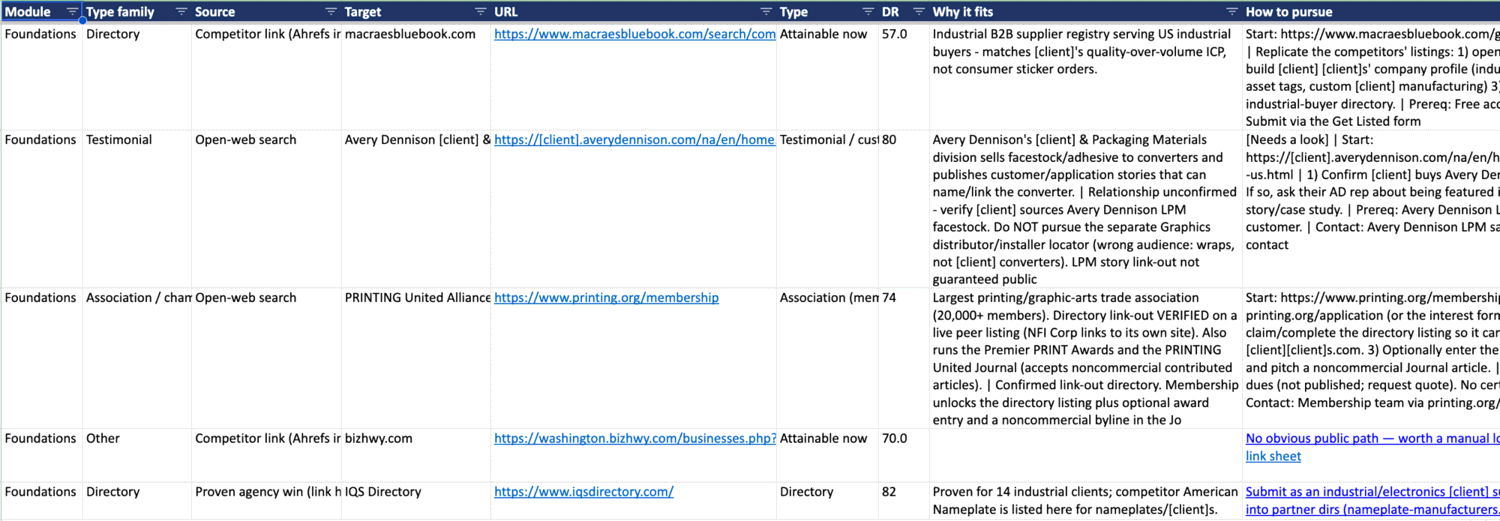
Then there's a score, which is really cool, and Claude Code did this itself. If you build this and yours doesn't, I'd ask it to. The score is based on domain rating, relevance, the module, and how easy the opportunity is perceived to get. There are 95 opportunities in this output, all ordered by Claude's suggested order.
After that I've got a couple of columns for checking the listing and seeing if it exists, a spot for the analyst to leave a note or a question, and, as you check opportunities off, a couple of formulas that calculate how many we've completed and what percentage is done. That can be nice to track.
Running it again later
So what do you do when you want to do another run? The cool thing is I built the tool to first check in on any existing workbooks. It goes through the workbook, spots the opportunities that are already found, and then when it does its new run, it ignores those. Which is really nice.
Where I draw the line with AI
I'm finding that Claude Code is getting so much better and more reliable at these research tasks. Not too long ago I tried this kind of thing, where it went out onto the web and accessed tools, and I wasn't really confident in what it returned. But now, with all these MCPs out there and Claude's own research capabilities improving, these kinds of master skills are much more viable and reliable.
Of course, we still have to have guardrails. I check Claude's work. I always give it the human eye and make sure the information I'm working with is accurate. This master skill follows my philosophy for AI and content: I use AI up to a point, and then I draw the line, and that's where I want human beings coming in.
If you haven't built a link prospector with AI, I hope this inspires you to do so. I suggest Claude Code, and I suggest using a number of sub-skills that feed up into one master skill. That gives you great output and a working list, and then I'd draw the line there and have human beings vet the output and do the outreach themselves for the greatest chance of success.
What makes the Master Prospector work
- Four specialists, one report. Sixth City's proprietary link history, Ahrefs Link Intersect, SparkToro audience research, and Google SERP searches each come at prospecting from a different angle, then a master skill dedupes and merges them.
- 10 minutes in, months of outreach out. One run can produce a year's worth of vetted link and mention opportunities, sequenced into foundations, velocity, growth, and expansion.
- It hands off cleanly. You get an explainer doc that reports like a direct report, plus a workbook with a scored, ordered opportunity list and a built-in how-to tab.
- The human still draws the line. AI does the upfront research; a person vets every opportunity and does the outreach. Always check the "already linked" flag yourself.