Today we're going to talk about a tool called Content Grapher. You can find it at contentgrapher.io, and here's the claim they make: AI is reading your content, don't make it guess. So this tool is going to map your content's concept structure. It's going to show what's complete, what's missing, and it even tells you what to do next.
It gives you some visualizations on how the concepts within your content map to each other, which ones are covered well, and which ones are missing. And then, like it said, it's going to give you recommendations, which I love. It's going to tell you how you can update your content, connect concepts better, and cover them more thoroughly.
But the other thing it does, which is really cool and isn't immediately obvious, is it tells you if there's a concept you're covering that actually deserves its own page. I really like that.
Running one of my own posts
I ran one of my own blog posts through this tool: how to choose the right keyword for any page. So it's just an SEO basics kind of post. What you do is give the tool the URL, but you can also paste in copy, which is really nice if you're a copywriter and you want to test one of your drafts. I chose the URL option and went ahead and performed the analysis.
You get five free analyses. After that you have to start paying, and from what I could see, the lowest tier is about 29 bucks, which is right in the neighborhood of what our AI tools commonly run, so I'm kind of used to that. If you get a lot of value out of this tool, maybe that's worth it.
The goal of the tool is to improve your content in terms of AI's interpretation of it. I think that's fine, but I'd probably have to test it to see if it actually improved AI visibility. I love it just as a content tool, it gives you great suggestions on how you can improve your writing. So that's how I look at it: it's not necessarily AI-specific.
The coverage score and the quadrants
Let's start with the coverage score: 70%. So I'm doing most things right here, but there are some opportunities, and that's great. Then you've got four quadrants, with some quick wins and some low priority. It really comes down to about five recommendations that are going to take my content to the next level.
I need to make all of these more explicit. The flags were all things I actually mention in the post:
- A Google Search competitor review in my title tag
- A title tag optimization relating to organic search results
- My primary keyword in the title tag
- AI as a collaborator, with a mention of ChatGPT
So we're seeing a theme here. It's relating two topics, Google Search competitor review and organic search results, so I need to do a better job connecting those concepts.
Suggestions in plain terms
Something I love is how the tool does a great job of explaining everything in plain terms. The tutorial covers keyword selection for SEO, that's my blog post, and it does a good job, but three concepts need stronger integration to complete the picture. The most important gap is closing the loop between keyword selection for SEO and the title tag. Without it, learners finish the process without knowing where the primary keyword actually lands on the page.
Now, this is a cool call-out. It's basically saying I tell people how to choose the keyword for SEO, but then I don't tell them what to do with it. I actually wrote another blog post on that exact topic. So I'm going to take this suggestion and mold it to my scenario. This is just like any other AI output. I'm not simply going to let it tell me what to do, I'm going to hear what it has to say, and then I'm going to use my own discretion and make my own decisions.
So for me, what I'm thinking is, at the end of this how-to-choose-a-keyword post, I'll add a line like, "Hey, the next step is knowing what to do with the keyword." That's going to open up a natural internal link opportunity for someone to hop over to my next blog post. I should have included that, and I didn't.
Tip: A coverage gap like this is often an internal-link opportunity in disguise. Closing the loop on one post usually points readers straight to the next one you've already written.
The next note was that Gemini and ChatGPT are referenced, but they're not given enough individual identity to help learners replicate the AI-as-a-collaborator step confidently. I do mention using AI as a helper in finding the primary keyword for a page, but I don't go into enough detail on exactly how you do that with tools like Gemini in Chrome and ChatGPT. So for me, this sums up to two recommendations. I like them both, and I'd absolutely go ahead and do them.
You can go to each explicit recommendation, these are the five dots from the quadrant visual, click them, and get more information. It tells you exactly what it suggests you do, and it gives you an example of what it means: here's how that writing could look. So if you're having writer's block and need that, it's there.
Connecting concepts
Here's another really cool part: how it tells you to connect concepts. For one, it flagged Google Search competitor review, organic search results, and title tag together. Its comment was to sequence those three concepts in order: explain that the learner runs a search, narrows attention to the organic search results, then reads each result's title tag to identify competitor keywords. Keeping the sequence tight prevents learners from getting lost on the search results page.
"I love when a tool doesn't just show you something, it tells you what to do next."
The tool also has a reanalyzer. If I kept it active, updated my blog post, gave it the content again, and reanalyzed, hopefully it would A/B the difference for me. I'm not totally sure if it shows a side-by-side or if I just have to record the results in my mind and see if there are simply fewer suggestions after my update. But I'm pretty sure it gives you a comparison and shows you how well you've made the changes.
The coverage matrix
The next section is a coverage matrix, and I really like this: eight questions a large language model needs answered to fully retrieve and cite your content. This is something you might build into your own copywriting workflow, something you could hand to actual human writers. Check out the eight:
- What is it (the concept)?
- How does it work?
- What does it depend on?
- What does it affect and produce?
- Who interacts with it?
- What are the constraints?
- What are the alternatives?
- Can you give an example?
That's a pretty cool framework to put your writing up against and make sure it hits all of these points. There's another readout right after it that does this on a concept-by-concept basis, breaking your writing down on an even more granular level. I've got primary keyword and brainstorming explained quite well, so I get good marks there. Title tag, Gemini, ChatGPT, those AI tools, maybe they're not explained as well and need more detail.
The visualization
Now here's where we come to the visualization, and this is where it maps out all the different concepts and how they relate. You've got some clickable options. By default it's on an observed-only view, which is fine, and you can see some of the things I was a little weaker on: the title tag, organic search results, and the AI tools, Gemini and ChatGPT. It's colored to show what I've covered well and what I've missed.
Then there's a gap view. If something's in red, it's totally missing, so the tool can come up with concepts you didn't cover at all and tell you to consider covering them. Some things are weakly integrated and come up in gray. So green is good, gray is not good, and red is totally missing.
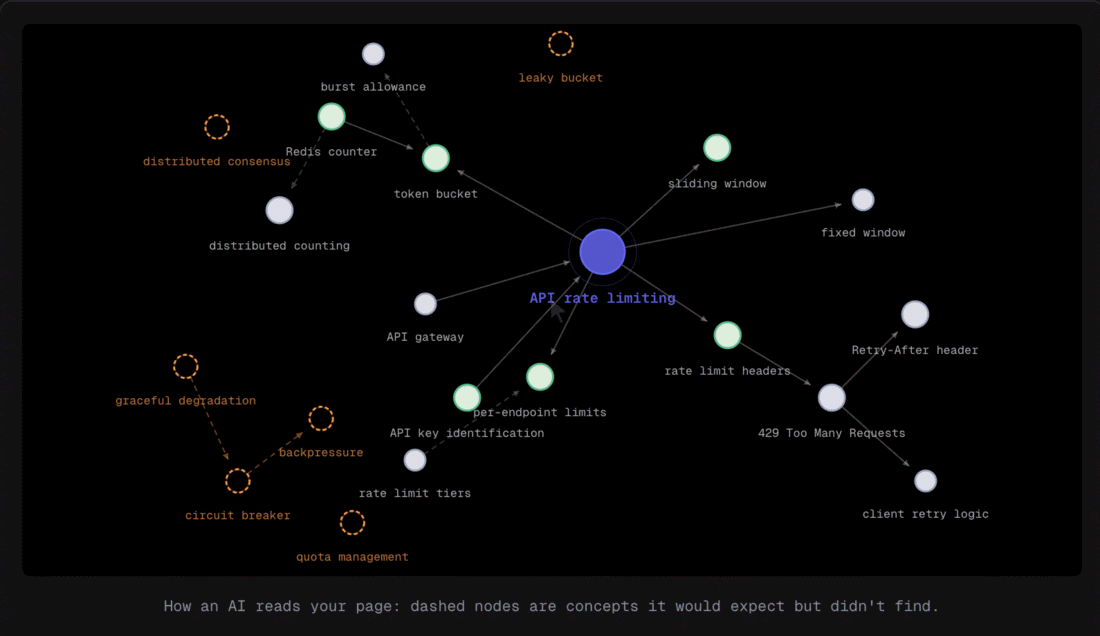
You can also click Show Scope. Core concepts are circled in green. A supportive concept gets circled in yellow. And there's even a blue circle if it belongs elsewhere, and that hearkens back to the feature I mentioned at the start: if there's a concept that meanders away from the topic's center, it suggests you put it on another piece of content. There's also a dashed red for concepts that are excluded or missing. This visual is really helpful, and it pairs nicely with all the other information the tool gives.
And here's that indication of whether I should keep this as one page or split some concepts onto others. This one is telling me to keep it as one page, probably because 70% of it came up written just fine.
Keep your human brain working
The final table is the concept scope. This is another area where you might see concepts that meandered a little, small portions of your writing that could have drifted. Keyword selection for SEO, obviously that's a keeper, it's the whole center of the thing. Brainstorming, AI collaboration, keyword competition, everything's looking good. One it suggested I shorten: "a single clear sentence is sufficient," so it's saying maybe I went into too much detail there.
And then there's one it's telling me to move. I did have a mention of keyword strategy, and that's what the tool is picking up on. But here's what's interesting, and this is why you always have to keep your human brain working with AI. I went back to my blog post, and keyword strategy is only mentioned in the final little call-to-action row. So the tool is acting as if I covered keyword strategy within my writing, but I actually didn't.
Vet every result
That "move this concept" flag was a false result, so I'm going to ignore it. The tool read a phrase in my closing CTA as a covered concept. Great tools still make these calls, so keep your own judgment switched on and check the flags against your actual copy.
But overall, this is a really great tool from contentgrapher.io. It's explicit, it's clear, it's actionable, and it's visual. There are a ton of great suggestions here, and to me, they very clearly would improve the writing. So try this one out and let me know what you think.
Why Content Grapher is worth a look
- It tells you what to do next. Most tools stop at showing you a score. This one maps your concepts, flags what's weak or missing, and gives specific recommendations with example copy.
- It catches concepts that deserve their own page. If a topic meanders away from the center, it tells you to split it out, which is a natural internal-link and new-content opportunity.
- The coverage matrix is a reusable framework. Eight questions an LLM needs answered, what it is, how it works, what it depends on, and so on, that you can hand to your writers.
- Keep your human brain on. It read a phrase in my closing CTA as a covered concept and flagged a false result. Treat its output like any AI output: hear it out, then decide for yourself.